

AI tools have become part of everyday digital workflows, and one of the most talked-about models in 2026 is Gemini 3. Whether you’re a student, content creator, marketer, or business owner, knowing how to communicate with AI properly can completely change the quality of your results.
The truth is simple: Gemini 3 is powerful, but the output you get depends heavily on how you write your prompt. A vague request leads to average answers, while a structured, clear prompt can produce highly useful, professional-level content.
That’s where prompt engineering comes in. Learning how to prompt like a pro is no longer optional—it’s becoming a digital skill just as important as writing or searching online.
In this guide, you’ll learn how to use Gemini 3 effectively, what makes a great prompt, real-world applications, comparisons with other AI tools, and practical techniques to get better results instantly.
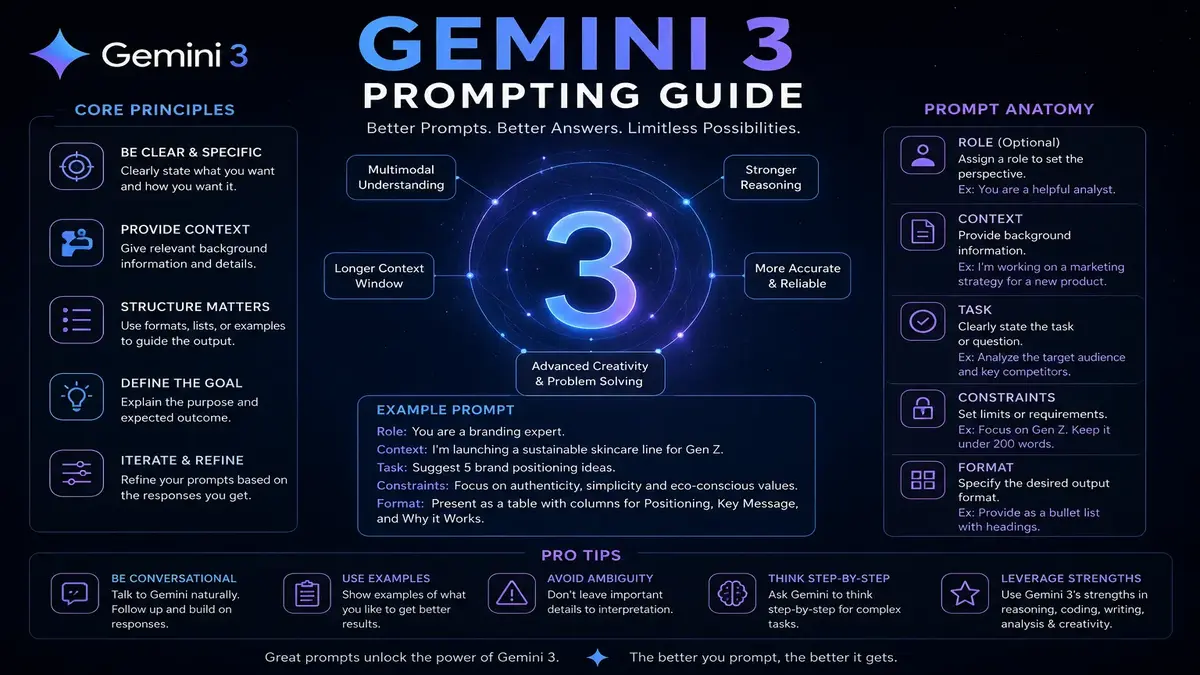
Table of Contents
What Is “How to Prompt Like a Pro with Gemini 3 in 2026”?
Prompting like a pro means learning how to give clear, structured, and goal-oriented instructions to Gemini 3 so it delivers accurate and useful responses.
Gemini 3 is Google’s advanced multimodal AI system designed to understand text, images, and contextual intent more deeply than earlier versions. It can help with writing, coding, brainstorming, research, and productivity tasks.
However, the key difference between beginners and advanced users lies in how they interact with it. Instead of typing short questions like “write a blog,” professional users provide structured prompts such as:
- Role (who the AI should act as)
- Task (what it should do)
- Context (background information)
- Output format (how the result should look)
- Tone (formal, casual, technical, etc.)
This structure allows Gemini 3 to generate more accurate, relevant, and usable results.
Key Features of Gemini 3 (Prompting Perspective)
Understanding Gemini 3’s capabilities helps you craft better prompts.
- Multimodal understanding – Works with text, images, and sometimes code inputs
- Improved reasoning – Handles complex instructions more accurately
- Context memory – Maintains continuity in longer conversations
- Faster response generation – Reduces wait time for outputs
- Creative adaptability – Adjusts tone and writing style based on prompt
These features mean your prompts can go beyond basic instructions. You can now request layered tasks, such as “analyze, summarize, and rewrite in simple language.”
Real-World Use Cases of Gemini 3 Prompting
Gemini 3 is used across many industries. Here’s how prompting skills make a difference:
For bloggers, it helps generate structured SEO articles, topic ideas, and outlines. A well-written prompt can save hours of drafting and editing.
For marketers, it assists in writing ad copy, email campaigns, and social media content tailored to different audiences.
For students, it simplifies complex topics, generates summaries, and helps prepare study notes.
For business owners, it supports report writing, customer communication, and strategic planning.
For developers, it helps debug code, explain algorithms, and generate snippets.
A strong prompt transforms Gemini 3 from a simple chatbot into a productivity assistant.
Pros and Cons of Gemini 3 Prompting
| Pros | Cons |
|---|---|
| Highly accurate when prompted well | Poor prompts give weak results |
| Supports multiple content formats | Requires learning curve |
| Saves time on repetitive tasks | Sometimes over-detailed outputs |
| Great for creative ideation | May need fact-checking |
| Works across industries | Internet dependency for best results |
While Gemini 3 is powerful, it still depends heavily on user input quality.
Pricing Overview
Gemini 3 is typically accessible through Google’s AI ecosystem, with both free and premium access levels depending on region and usage.
- Free plan: Basic access with limited usage and features
- Paid tiers: Advanced capabilities, higher usage limits, and priority processing (varies by Google AI subscription plans)
Pricing structures may evolve as Google integrates Gemini into more services like Workspace and Android ecosystems.
Gemini 3 vs Other AI Tools
| Feature | Gemini 3 | ChatGPT (GPT-5 class models) | Claude AI |
|---|---|---|---|
| Multimodal support | Strong | Strong | Moderate |
| Reasoning ability | High | Very high | High |
| Integration | Google ecosystem | Microsoft ecosystem | Limited integrations |
| Content creation | Excellent | Excellent | Excellent |
| Speed | Fast | Fast | Moderate |
Each tool has strengths, but Gemini 3 stands out for its deep integration with Google services and real-time contextual capabilities.
Tips for Prompting Gemini 3 Like a Pro
Writing better prompts is about clarity and structure.
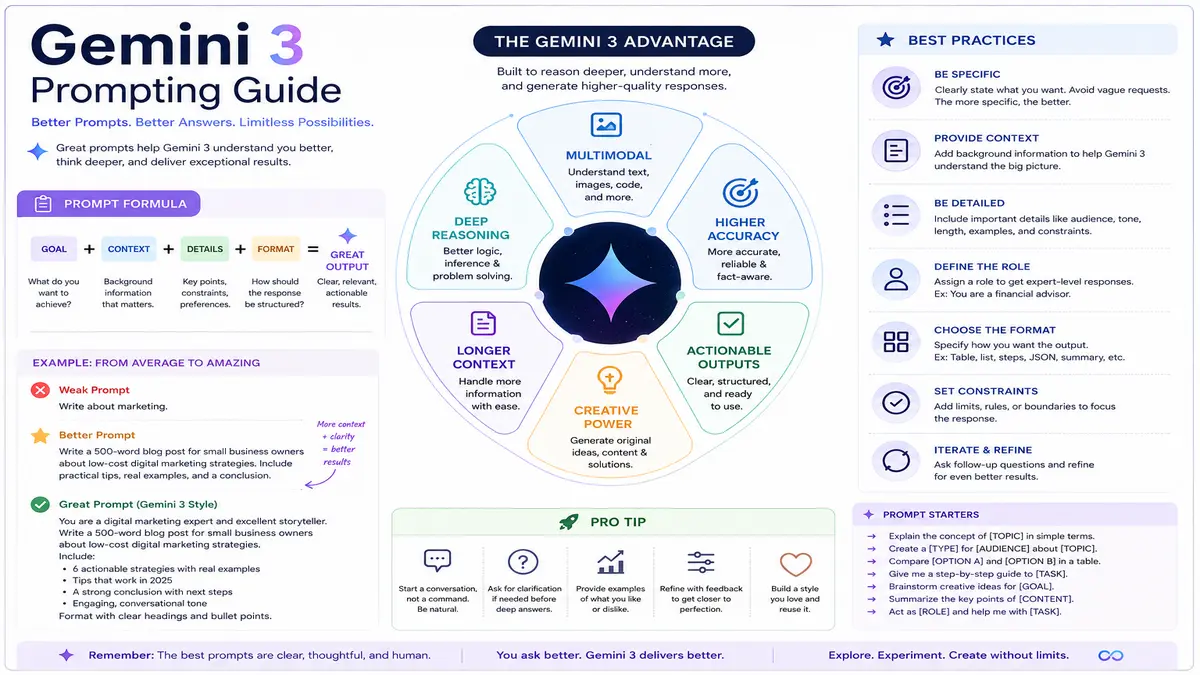
Start by defining the role clearly. Instead of “write a blog,” try “act as an SEO expert and write a beginner-friendly blog.”
Add context whenever possible. The more details you provide, the more accurate the output becomes.
Be specific about format. If you want bullet points, tables, or step-by-step instructions, mention it clearly.
Break complex tasks into multiple steps instead of one long instruction.
Experiment with tone settings such as formal, conversational, or technical, depending on your audience.
Finally, refine your prompts based on results. Prompting is iterative, not one-time.
Conclusion
Learning how to prompt Gemini 3 effectively is becoming a valuable digital skill in 2026. The difference between average and high-quality results often comes down to how well you structure your instructions.
With the right approach, Gemini 3 can support writing, research, marketing, learning, and business tasks in a highly efficient way. Instead of replacing human work, it enhances productivity and creativity when used correctly.